DaVinci Resolve is an incredibly powerful tool which you can try for free today. It combines multiple video editing programs and plug-ins into one versatile package.
Why Choose Davinci Resolve?
DaVinci Resolve is a versatile program which has the power to edit and create audio and video projects. While often compared to Sony Vegas and Adobe Premier Pro, it has several utilities which you would have to outsource and bring into your projects.
Pros
- Free To Use
- Fusion Tab for more creative edits
- Powerful custom tools
- Has everything built in
Cons
- Steep Learning Curve
- Heavy processing demands
- Large Cache Size
- A lot for beginners
- Not Compatible with Adobe
How To Get DaVinci Resolve
You can find everything you need to Download and Install DaVinci Resolve on their website.
Davinci Resolve Tabs
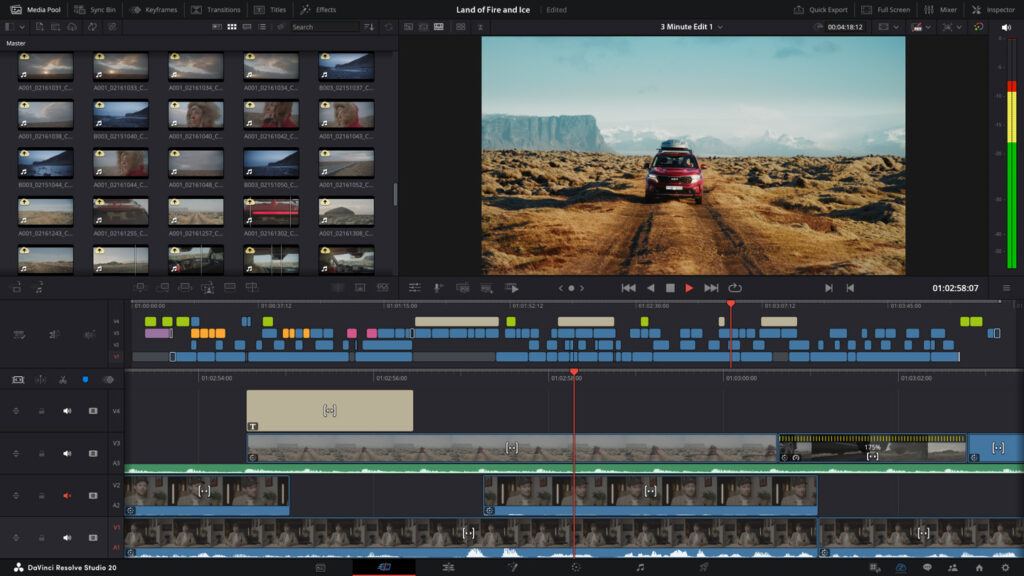
Each tab along the bottom of the DaVinci screen has a function. Many actions can be performed in different tabs but it’s worth familiarising yourself with their uses and exploring the various docks available in each tab.

Media – This tab is where you can bring media into your project file and manage what assets you have ready for editing. Although you can do some of the functions in other tabs, such as dragging files directly into your timeline.
Cut – The cut tab is where you can organise your video clips and align different cameras together. Weaving your files together and cutting the dead air can be easily done over multiple layers.
Edit – Gain control of the smaller details in the edit tab. Move things around your timeline and introduce all your favourite assets with ease. From this tab you can move back into the cut tab for retiming and trimming or you can move into the fusion or colour tabs for more intricate work.
Fusion – The fusion tab combines SFX and a multitude of other handy tools such as masks and colour changes. This tab uses a node based system to add and layer effects onto a clip, and can even simulate moving around a 3D environment or animate.
Colour – The colour tab is pretty self explanatory but includes some bonus tools such as windows/masks and other colour gradient effects.
Sound – Take control of your audio and elevate your videos to ensure the ultimate viewer experience.
Deliver – Use this tab to confirm the quality of your output and export. Here you can bake subtitles into your projects, render audio only and change your render quality. There’s even an option to upload to YouTube when you’re done.
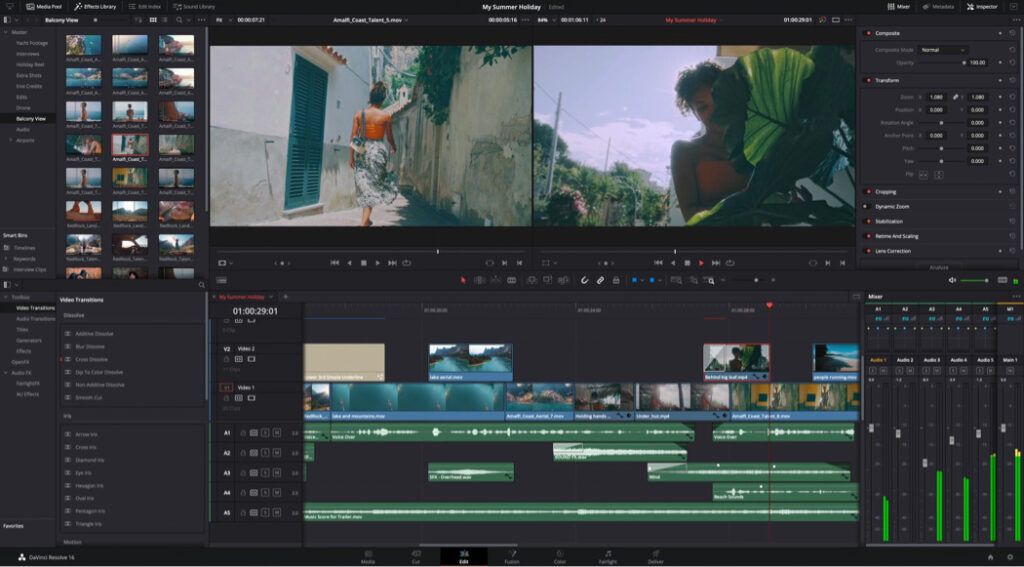
Davinci Resolve Pro
Although the base version of DaVinci Resole is free, there is a studio version which carries a single life-time licence price of around £300. This gives you access to new AI-processing tools and some bonus filters, titles and transitions. However, the pro version is often given away for free with Black Magic Design tools.
Black Magic Design Hardware
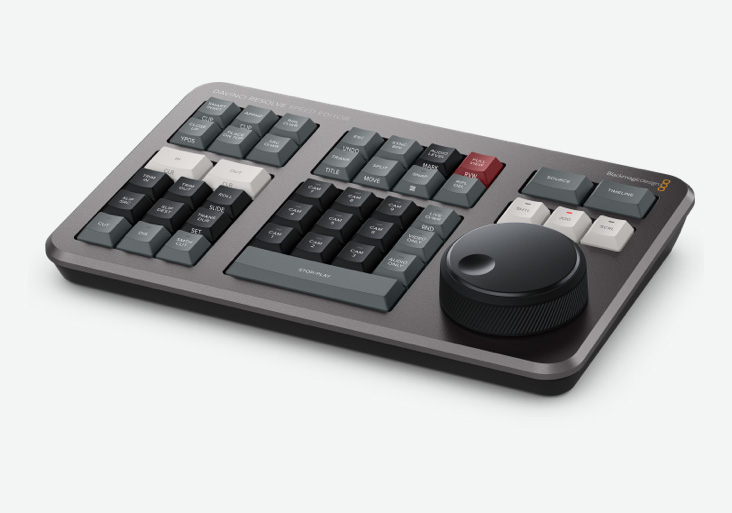
Although it’s how we found them, DaVinci Resolve isn’t Black Magic Design’s main focus. They actually started out doing cameras and editing tools, such as their speed editor. If you’re editing a lot, it’s worth looking at their full catalogue to see if there are any tools to streamline your process.
We’re not sponsored or anything but this is the one that Mashashy uses. You can find it on their website here.
Looking For More on DaVinci Resolve?
Check out our other DaVinci Resolve tutorials and level up your content game today!
[{"id":7295,"link":"https:\/\/treatyourgeek.co.uk\/davinci-resolve-essential-keyboard-shortcuts\/","name":"davinci-resolve-essential-keyboard-shortcuts","thumbnail":{"url":"https:\/\/treatyourgeek.co.uk\/wp-content\/uploads\/2025\/12\/davinci-essential-shortcuts.png","alt":"Davinci Resolve Essential Short Cuts Thumbnail"},"title":"DaVinci Resolve: Essential Keyboard Shortcuts","postMeta":[],"author":{"name":"Scruff","link":"https:\/\/treatyourgeek.co.uk\/author\/scruff\/"},"date":"Dec 17, 2025","dateGMT":"2025-12-17 13:25:55","modifiedDate":"2025-12-17 13:25:56","modifiedDateGMT":"2025-12-17 13:25:56","commentCount":"2","commentStatus":"open","categories":{"coma":"<a href=\"https:\/\/treatyourgeek.co.uk\/category\/tutorials\/davinci-resolve\/\" rel=\"category tag\">Davinci Resolve<\/a>","space":"<a href=\"https:\/\/treatyourgeek.co.uk\/category\/tutorials\/davinci-resolve\/\" rel=\"category tag\">Davinci Resolve<\/a>"},"taxonomies":{"post_tag":"<a href='https:\/\/treatyourgeek.co.uk\/tag\/black-magic-design\/' rel='post_tag'>Black Magic Design<\/a><a href='https:\/\/treatyourgeek.co.uk\/tag\/davinci-resolve\/' rel='post_tag'>davinci resolve<\/a><a href='https:\/\/treatyourgeek.co.uk\/tag\/editing\/' rel='post_tag'>editing<\/a><a href='https:\/\/treatyourgeek.co.uk\/tag\/essential\/' rel='post_tag'>essential<\/a><a href='https:\/\/treatyourgeek.co.uk\/tag\/keyboard-commands\/' rel='post_tag'>keyboard commands<\/a><a href='https:\/\/treatyourgeek.co.uk\/tag\/tutorial\/' rel='post_tag'>tutorial<\/a><a href='https:\/\/treatyourgeek.co.uk\/tag\/video\/' rel='post_tag'>video<\/a>"},"readTime":{"min":2,"sec":11},"status":"publish","excerpt":"An Introduction to DaVinci Resolve's keyboard shortcuts to help streamline your workflow."},{"id":7261,"link":"https:\/\/treatyourgeek.co.uk\/davinci-resolve-video-editing-software-introduction\/","name":"davinci-resolve-video-editing-software-introduction","thumbnail":{"url":"https:\/\/treatyourgeek.co.uk\/wp-content\/uploads\/2025\/12\/an-into-to-davinci-resolve.png","alt":"an introduction to davinci resolve thumbnail"},"title":"DaVinci Resolve - Video Editing Software - Introduction","postMeta":[],"author":{"name":"Scruff","link":"https:\/\/treatyourgeek.co.uk\/author\/scruff\/"},"date":"Dec 15, 2025","dateGMT":"2025-12-15 15:02:54","modifiedDate":"2025-12-15 15:07:13","modifiedDateGMT":"2025-12-15 15:07:13","commentCount":"0","commentStatus":"open","categories":{"coma":"<a href=\"https:\/\/treatyourgeek.co.uk\/category\/tutorials\/davinci-resolve\/\" rel=\"category tag\">Davinci Resolve<\/a>","space":"<a href=\"https:\/\/treatyourgeek.co.uk\/category\/tutorials\/davinci-resolve\/\" rel=\"category tag\">Davinci Resolve<\/a>"},"taxonomies":{"post_tag":"<a href='https:\/\/treatyourgeek.co.uk\/tag\/black-magic-design\/' rel='post_tag'>Black Magic Design<\/a><a href='https:\/\/treatyourgeek.co.uk\/tag\/content-creation\/' rel='post_tag'>content creation<\/a><a href='https:\/\/treatyourgeek.co.uk\/tag\/davinci-resolve\/' rel='post_tag'>davinci resolve<\/a><a href='https:\/\/treatyourgeek.co.uk\/tag\/editing-programs\/' rel='post_tag'>editing programs<\/a><a href='https:\/\/treatyourgeek.co.uk\/tag\/editing-software\/' rel='post_tag'>editing software<\/a><a href='https:\/\/treatyourgeek.co.uk\/tag\/streamer-tools\/' rel='post_tag'>streamer tools<\/a><a href='https:\/\/treatyourgeek.co.uk\/tag\/tutorial\/' rel='post_tag'>tutorial<\/a><a href='https:\/\/treatyourgeek.co.uk\/tag\/video-editing\/' rel='post_tag'>video editing<\/a>"},"readTime":{"min":2,"sec":52},"status":"publish","excerpt":"An introduction to DaVinci Resolve, the powerful video editing software you can add to your arsenal for free."}]
About the Author