
FugiTech recently updated their Discord Reactive Images tool and while much of the utility remains the same, there have been some complaints. There have been clear server issues since the update and some tools are now hidden behind a paywall, so let’s have a look at the new update and what’s changed.
- New Layout
- User Models
- Sources
- Custom Sources & Avatar Overrides
- Bonus API Settings
- Is It Really That Bad?
- More Tutorials
New Layout
Originally, Reactive Fugi.Tech used a single page layout. This has now been replaced with a top bar for each of your docks. Although, the font and colours have remained largely the same.

User Models
Users previously had a library dock but it is now in it’s own tab. Here you have the ability to add your own avatars to Reactive FugiTech and switch between them.
There was a limit on these before but it has been increased from 8 to 25.
Once your avatar is uploaded to FugiTech, you can set it as active and switch between them freely.
If you’re interested in seeing how to add web sources to your OBS please check out our previous tutorial.

To add your model to the library, click “Add Model” to open the pop-up menu.
Here you can input and name and upload the speaking, and inactive images as you wish.
Click save once you are finished and your model is ready for action.

Sources
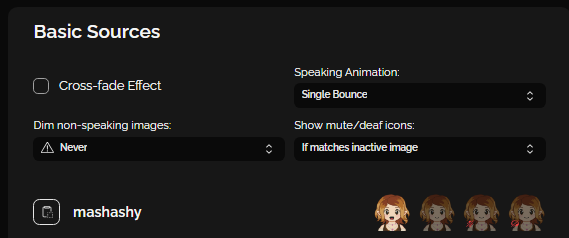
In the sources tab, you will find two docks: Basic Sources and Custom Sources.
Basic Sources allow you to open a link using the clipboard icon and paste it into OBS directly as a web source. It’s streamlined and simplified, but there’s very little you can edit on them.
This feature has now been moved to Custom Sources.
Custom Sources & Avatar Overrides
This new dock seems to be the source of most people’s frustration. Users of Reactive FugiTech will likely find this tab is already full. Meaning they are unable to make more, but let’s take a quick look at the options.
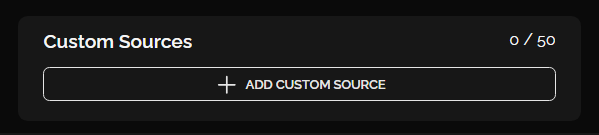
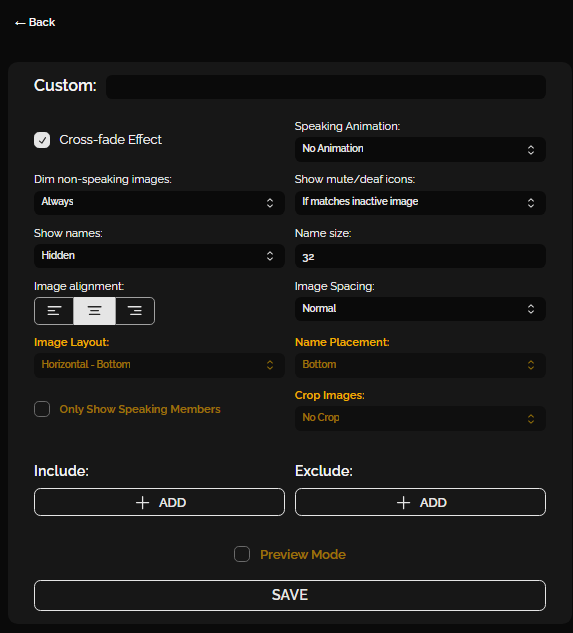
The new custom sources dock allows you to build groups and add custom avatars for users.
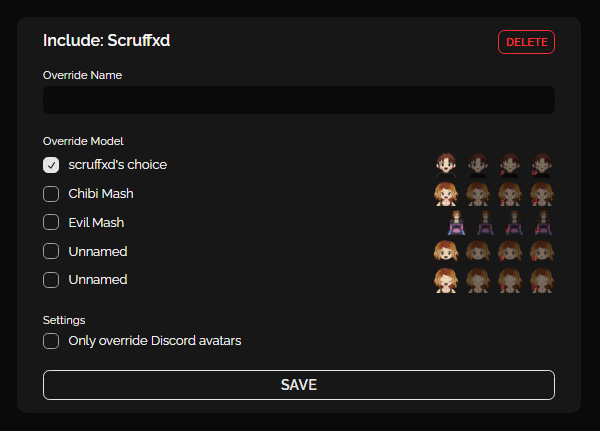
First you need to click “+ Add” under Include and then you can override the image with one of your own.
Bonus API Settings
There are a few other tools hidden behind the premium membership, but it’s worth mentioning the API settings. You’re able to connect to various apps to switch automatically between avatars, which has numerous uses.

Is It Really That Bad?
Honestly, no, it’s not bad at all. I get that there were some teething issues and things were hidden behind the customise dock, but the tools are still there. Our previous Reactive FugiTech tutorial follows all the same processes, they’re just in a different dock and were harder to find.
The server issues should also be solved shortly, if they have not been already. Reactive FugiTech has an active development team and they seem to be hot on the case. So, let’s hope these were just minor teething issues, because Reactive FugiTech is an incredible and versatile streaming tool. It’s also free,
Check out our previous tutorial for more ideas on how to use Reactive FugiTech.
More Tutorials
Check out our other tutorials and level up your stream today!
Want More Tutorials?
Looking to level up your streams more? Check out our other tutorials now.
[{"id":7295,"link":"https:\/\/treatyourgeek.co.uk\/davinci-resolve-essential-keyboard-shortcuts\/","name":"davinci-resolve-essential-keyboard-shortcuts","thumbnail":{"url":"https:\/\/treatyourgeek.co.uk\/wp-content\/uploads\/2025\/12\/davinci-essential-shortcuts.png","alt":"Davinci Resolve Essential Short Cuts Thumbnail"},"title":"DaVinci Resolve: Essential Keyboard Shortcuts","postMeta":[],"author":{"name":"Scruff","link":"https:\/\/treatyourgeek.co.uk\/author\/scruff\/"},"date":"Dec 17, 2025","dateGMT":"2025-12-17 13:25:55","modifiedDate":"2025-12-17 13:25:56","modifiedDateGMT":"2025-12-17 13:25:56","commentCount":"2","commentStatus":"open","categories":{"coma":"<a href=\"https:\/\/treatyourgeek.co.uk\/category\/tutorials\/davinci-resolve\/\" rel=\"category tag\">Davinci Resolve<\/a>","space":"<a href=\"https:\/\/treatyourgeek.co.uk\/category\/tutorials\/davinci-resolve\/\" rel=\"category tag\">Davinci Resolve<\/a>"},"taxonomies":{"post_tag":"<a href='https:\/\/treatyourgeek.co.uk\/tag\/black-magic-design\/' rel='post_tag'>Black Magic Design<\/a><a href='https:\/\/treatyourgeek.co.uk\/tag\/davinci-resolve\/' rel='post_tag'>davinci resolve<\/a><a href='https:\/\/treatyourgeek.co.uk\/tag\/editing\/' rel='post_tag'>editing<\/a><a href='https:\/\/treatyourgeek.co.uk\/tag\/essential\/' rel='post_tag'>essential<\/a><a href='https:\/\/treatyourgeek.co.uk\/tag\/keyboard-commands\/' rel='post_tag'>keyboard commands<\/a><a href='https:\/\/treatyourgeek.co.uk\/tag\/tutorial\/' rel='post_tag'>tutorial<\/a><a href='https:\/\/treatyourgeek.co.uk\/tag\/video\/' rel='post_tag'>video<\/a>"},"readTime":{"min":2,"sec":11},"status":"publish","excerpt":"An Introduction to DaVinci Resolve's keyboard shortcuts to help streamline your workflow."},{"id":7261,"link":"https:\/\/treatyourgeek.co.uk\/davinci-resolve-video-editing-software-introduction\/","name":"davinci-resolve-video-editing-software-introduction","thumbnail":{"url":"https:\/\/treatyourgeek.co.uk\/wp-content\/uploads\/2025\/12\/an-into-to-davinci-resolve.png","alt":"an introduction to davinci resolve thumbnail"},"title":"DaVinci Resolve - Video Editing Software - Introduction","postMeta":[],"author":{"name":"Scruff","link":"https:\/\/treatyourgeek.co.uk\/author\/scruff\/"},"date":"Dec 15, 2025","dateGMT":"2025-12-15 15:02:54","modifiedDate":"2025-12-15 15:07:13","modifiedDateGMT":"2025-12-15 15:07:13","commentCount":"0","commentStatus":"open","categories":{"coma":"<a href=\"https:\/\/treatyourgeek.co.uk\/category\/tutorials\/davinci-resolve\/\" rel=\"category tag\">Davinci Resolve<\/a>","space":"<a href=\"https:\/\/treatyourgeek.co.uk\/category\/tutorials\/davinci-resolve\/\" rel=\"category tag\">Davinci Resolve<\/a>"},"taxonomies":{"post_tag":"<a href='https:\/\/treatyourgeek.co.uk\/tag\/black-magic-design\/' rel='post_tag'>Black Magic Design<\/a><a href='https:\/\/treatyourgeek.co.uk\/tag\/content-creation\/' rel='post_tag'>content creation<\/a><a href='https:\/\/treatyourgeek.co.uk\/tag\/davinci-resolve\/' rel='post_tag'>davinci resolve<\/a><a href='https:\/\/treatyourgeek.co.uk\/tag\/editing-programs\/' rel='post_tag'>editing programs<\/a><a href='https:\/\/treatyourgeek.co.uk\/tag\/editing-software\/' rel='post_tag'>editing software<\/a><a href='https:\/\/treatyourgeek.co.uk\/tag\/streamer-tools\/' rel='post_tag'>streamer tools<\/a><a href='https:\/\/treatyourgeek.co.uk\/tag\/tutorial\/' rel='post_tag'>tutorial<\/a><a href='https:\/\/treatyourgeek.co.uk\/tag\/video-editing\/' rel='post_tag'>video editing<\/a>"},"readTime":{"min":2,"sec":52},"status":"publish","excerpt":"An introduction to DaVinci Resolve, the powerful video editing software you can add to your arsenal for free."},{"id":7008,"link":"https:\/\/treatyourgeek.co.uk\/an-introduction-to-vdo-ninja-tutorial\/","name":"an-introduction-to-vdo-ninja-tutorial","thumbnail":{"url":"https:\/\/treatyourgeek.co.uk\/wp-content\/uploads\/2025\/10\/vdo-ninja-thumbnail.png","alt":""},"title":"An Introduction To VDO-Ninja - Tutorial","postMeta":[],"author":{"name":"Mashashy","link":"https:\/\/treatyourgeek.co.uk\/author\/mashashygooglemail-com\/"},"date":"Oct 15, 2025","dateGMT":"2025-10-15 10:32:24","modifiedDate":"2025-10-15 13:09:37","modifiedDateGMT":"2025-10-15 13:09:37","commentCount":"0","commentStatus":"open","categories":{"coma":"<a href=\"https:\/\/treatyourgeek.co.uk\/category\/tutorials\/streaming-tools\/\" rel=\"category tag\">Streaming Tools<\/a>","space":"<a href=\"https:\/\/treatyourgeek.co.uk\/category\/tutorials\/streaming-tools\/\" rel=\"category tag\">Streaming Tools<\/a>"},"taxonomies":{"post_tag":"<a href='https:\/\/treatyourgeek.co.uk\/tag\/conference\/' rel='post_tag'>conference<\/a><a href='https:\/\/treatyourgeek.co.uk\/tag\/discord\/' rel='post_tag'>discord<\/a><a href='https:\/\/treatyourgeek.co.uk\/tag\/skype\/' rel='post_tag'>skype<\/a><a href='https:\/\/treatyourgeek.co.uk\/tag\/stream\/' rel='post_tag'>stream<\/a><a href='https:\/\/treatyourgeek.co.uk\/tag\/streaming-tools\/' rel='post_tag'>streaming tools<\/a><a href='https:\/\/treatyourgeek.co.uk\/tag\/tutorial\/' rel='post_tag'>tutorial<\/a><a href='https:\/\/treatyourgeek.co.uk\/tag\/vdo-ninja\/' rel='post_tag'>vdo-ninja<\/a><a href='https:\/\/treatyourgeek.co.uk\/tag\/zoom\/' rel='post_tag'>zoom<\/a>"},"readTime":{"min":2,"sec":24},"status":"publish","excerpt":"Introducing VDO-Ninja, the nifty conference tool built into your browser. Become a pro with four handy ways to use it."}]
About the Author