The biggest update to Streamer.bot has landed and the difference is staggering. We have a fancy new user-interface (UI) and streamlined tools to take your streams to the next level.
Don’t worry if you’re only just getting started with Streamer.bot. TYG are here with a bunch of simplified tutorials to help you get your head around it all. So, be sure to come back and check them out as we will be releasing more now the release is live.
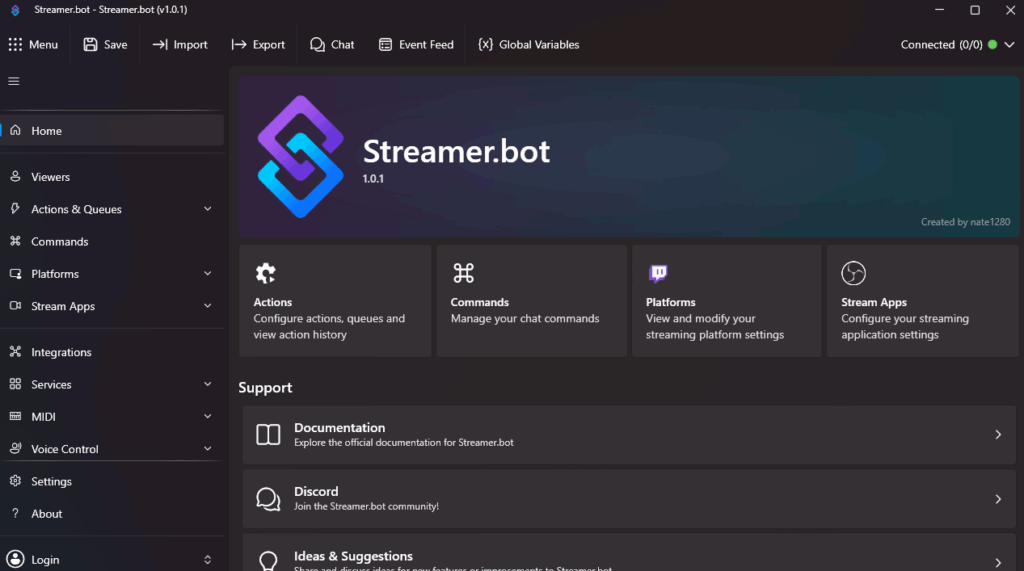
What Is Streamer.bot?
For those of you new to Streamer.bot, it’s a way control various aspects of your streaming set up and automate the process. Inputting commands into your chat will initiate various actions such as media pop-ups, sounds and even text-to-speech (TTS).
What’s New?
You can find a full list of changes of the Streamer.bot website but here are some of our favourites.
New Layout
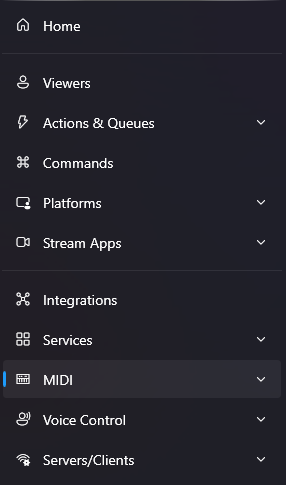
The task bar has been moved along the side of the screen and features drop-down menus for easy access. It also highlights a few features that were previously hidden.
Dark Mode
Not only is it accessible but everyone loves Dark Mode.
HotKey Triggers
You can now set up hotkeys as triggers in any combination. Previously, the best way to do this was via a Stream Deck or other console, adding to versatility
Host Your Own Files
Users now have the ability to host their own files from the integrated HTTP Server.
Is It Time To Make The Switch?
Although previous versions of Streamer.bot will still work, the new update does make a lot of things more streamlined and easier to use. We’ve been working through transferring our commands over and found a few changes to the system, meaning some of your commands may need editing if you decide to import them.
Streamer.bot 1.0 is now stable and ready for use. You can download all the files you need to get started at this link. Be sure to check back as we begin posting updated tutorials here on our website.
Want More Tutorials?
Looking to level up your streams more? Check out our other tutorials now.
[{"id":7295,"link":"https:\/\/treatyourgeek.co.uk\/davinci-resolve-essential-keyboard-shortcuts\/","name":"davinci-resolve-essential-keyboard-shortcuts","thumbnail":{"url":"https:\/\/treatyourgeek.co.uk\/wp-content\/uploads\/2025\/12\/davinci-essential-shortcuts.png","alt":"Davinci Resolve Essential Short Cuts Thumbnail"},"title":"DaVinci Resolve: Essential Keyboard Shortcuts","postMeta":[],"author":{"name":"Scruff","link":"https:\/\/treatyourgeek.co.uk\/author\/scruff\/"},"date":"Dec 17, 2025","dateGMT":"2025-12-17 13:25:55","modifiedDate":"2025-12-17 13:25:56","modifiedDateGMT":"2025-12-17 13:25:56","commentCount":"2","commentStatus":"open","categories":{"coma":"<a href=\"https:\/\/treatyourgeek.co.uk\/category\/tutorials\/davinci-resolve\/\" rel=\"category tag\">Davinci Resolve<\/a>","space":"<a href=\"https:\/\/treatyourgeek.co.uk\/category\/tutorials\/davinci-resolve\/\" rel=\"category tag\">Davinci Resolve<\/a>"},"taxonomies":{"post_tag":"<a href='https:\/\/treatyourgeek.co.uk\/tag\/black-magic-design\/' rel='post_tag'>Black Magic Design<\/a><a href='https:\/\/treatyourgeek.co.uk\/tag\/davinci-resolve\/' rel='post_tag'>davinci resolve<\/a><a href='https:\/\/treatyourgeek.co.uk\/tag\/editing\/' rel='post_tag'>editing<\/a><a href='https:\/\/treatyourgeek.co.uk\/tag\/essential\/' rel='post_tag'>essential<\/a><a href='https:\/\/treatyourgeek.co.uk\/tag\/keyboard-commands\/' rel='post_tag'>keyboard commands<\/a><a href='https:\/\/treatyourgeek.co.uk\/tag\/tutorial\/' rel='post_tag'>tutorial<\/a><a href='https:\/\/treatyourgeek.co.uk\/tag\/video\/' rel='post_tag'>video<\/a>"},"readTime":{"min":2,"sec":11},"status":"publish","excerpt":"An Introduction to DaVinci Resolve's keyboard shortcuts to help streamline your workflow."},{"id":7261,"link":"https:\/\/treatyourgeek.co.uk\/davinci-resolve-video-editing-software-introduction\/","name":"davinci-resolve-video-editing-software-introduction","thumbnail":{"url":"https:\/\/treatyourgeek.co.uk\/wp-content\/uploads\/2025\/12\/an-into-to-davinci-resolve.png","alt":"an introduction to davinci resolve thumbnail"},"title":"DaVinci Resolve - Video Editing Software - Introduction","postMeta":[],"author":{"name":"Scruff","link":"https:\/\/treatyourgeek.co.uk\/author\/scruff\/"},"date":"Dec 15, 2025","dateGMT":"2025-12-15 15:02:54","modifiedDate":"2025-12-15 15:07:13","modifiedDateGMT":"2025-12-15 15:07:13","commentCount":"0","commentStatus":"open","categories":{"coma":"<a href=\"https:\/\/treatyourgeek.co.uk\/category\/tutorials\/davinci-resolve\/\" rel=\"category tag\">Davinci Resolve<\/a>","space":"<a href=\"https:\/\/treatyourgeek.co.uk\/category\/tutorials\/davinci-resolve\/\" rel=\"category tag\">Davinci Resolve<\/a>"},"taxonomies":{"post_tag":"<a href='https:\/\/treatyourgeek.co.uk\/tag\/black-magic-design\/' rel='post_tag'>Black Magic Design<\/a><a href='https:\/\/treatyourgeek.co.uk\/tag\/content-creation\/' rel='post_tag'>content creation<\/a><a href='https:\/\/treatyourgeek.co.uk\/tag\/davinci-resolve\/' rel='post_tag'>davinci resolve<\/a><a href='https:\/\/treatyourgeek.co.uk\/tag\/editing-programs\/' rel='post_tag'>editing programs<\/a><a href='https:\/\/treatyourgeek.co.uk\/tag\/editing-software\/' rel='post_tag'>editing software<\/a><a href='https:\/\/treatyourgeek.co.uk\/tag\/streamer-tools\/' rel='post_tag'>streamer tools<\/a><a href='https:\/\/treatyourgeek.co.uk\/tag\/tutorial\/' rel='post_tag'>tutorial<\/a><a href='https:\/\/treatyourgeek.co.uk\/tag\/video-editing\/' rel='post_tag'>video editing<\/a>"},"readTime":{"min":2,"sec":52},"status":"publish","excerpt":"An introduction to DaVinci Resolve, the powerful video editing software you can add to your arsenal for free."},{"id":7008,"link":"https:\/\/treatyourgeek.co.uk\/an-introduction-to-vdo-ninja-tutorial\/","name":"an-introduction-to-vdo-ninja-tutorial","thumbnail":{"url":"https:\/\/treatyourgeek.co.uk\/wp-content\/uploads\/2025\/10\/vdo-ninja-thumbnail.png","alt":""},"title":"An Introduction To VDO-Ninja - Tutorial","postMeta":[],"author":{"name":"Mashashy","link":"https:\/\/treatyourgeek.co.uk\/author\/mashashygooglemail-com\/"},"date":"Oct 15, 2025","dateGMT":"2025-10-15 10:32:24","modifiedDate":"2025-10-15 13:09:37","modifiedDateGMT":"2025-10-15 13:09:37","commentCount":"0","commentStatus":"open","categories":{"coma":"<a href=\"https:\/\/treatyourgeek.co.uk\/category\/tutorials\/streaming-tools\/\" rel=\"category tag\">Streaming Tools<\/a>","space":"<a href=\"https:\/\/treatyourgeek.co.uk\/category\/tutorials\/streaming-tools\/\" rel=\"category tag\">Streaming Tools<\/a>"},"taxonomies":{"post_tag":"<a href='https:\/\/treatyourgeek.co.uk\/tag\/conference\/' rel='post_tag'>conference<\/a><a href='https:\/\/treatyourgeek.co.uk\/tag\/discord\/' rel='post_tag'>discord<\/a><a href='https:\/\/treatyourgeek.co.uk\/tag\/skype\/' rel='post_tag'>skype<\/a><a href='https:\/\/treatyourgeek.co.uk\/tag\/stream\/' rel='post_tag'>stream<\/a><a href='https:\/\/treatyourgeek.co.uk\/tag\/streaming-tools\/' rel='post_tag'>streaming tools<\/a><a href='https:\/\/treatyourgeek.co.uk\/tag\/tutorial\/' rel='post_tag'>tutorial<\/a><a href='https:\/\/treatyourgeek.co.uk\/tag\/vdo-ninja\/' rel='post_tag'>vdo-ninja<\/a><a href='https:\/\/treatyourgeek.co.uk\/tag\/zoom\/' rel='post_tag'>zoom<\/a>"},"readTime":{"min":2,"sec":24},"status":"publish","excerpt":"Introducing VDO-Ninja, the nifty conference tool built into your browser. Become a pro with four handy ways to use it."}]
About the Author