DaVinci Resolve is a powerful editing tool which can be daunting to start off, but with practice there literally is no limit to your imagination. To help you get started, we will take you through essential keyboard hotkeys that will revolutionise your workflow.
Open File Manager
To add your media to the project there are multiple ways you can do this. You can locate the master window and right-click, this brings up a menu and you can select “import media” (or you can Ctrl+I) this will open a file manager window where you can locate your media from your folders.
Control Your Video
Space is the old reliable play/pause button it always has been.
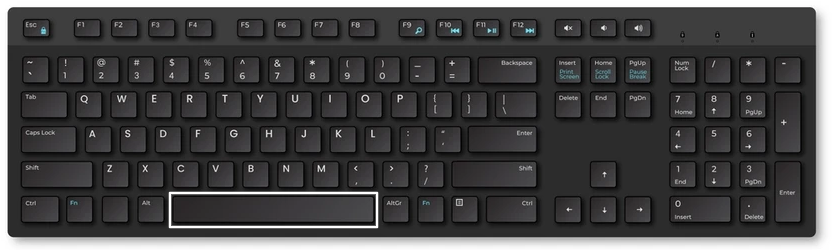
J, K + L act as your backwards, pause and forward buttons which is handy if you look at the layout on a qwerty keyboard in an intuitive position. Pressing the forwards or backwards key multiple times will double the speed with each press. Handy for scrubbing through long content!
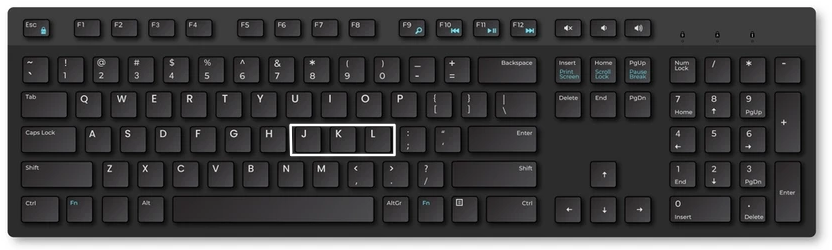
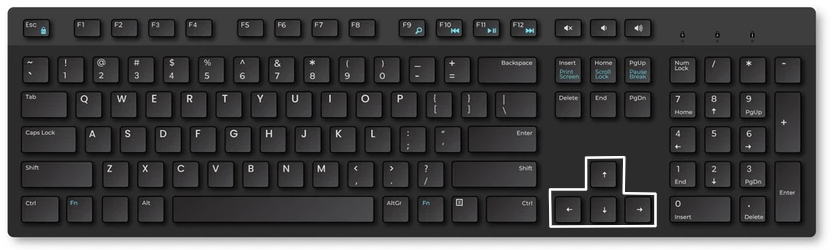
The arrow keys have function as well. Left and Right will go frame by frame with each press, Up will go to the start of a clip and Down will go to the end.
Cut, Paste, Undo
These are classic PC commands that everyone can use across lots of programs. They work just the same as they would in most programs.
- Ctrl+Z is undo. This will be your lifeline. Any mistakes can be undone as long as the project hasn’t been closed.
- Ctl+X is cut
- Ctrl+V is paste.
Backspace Vs Delete
In DaVinci Resolve, the delete and backspace keys have similar but different purposes.
- Backspace removes the current selection of clips from your timeline, leaving a space behind.
- Delete removes the current selection and that section of the timeline, snapping the two sections together. Otherwise known as a “Ripple Delete“
Depending on how your timeline is formatted, using delete can cause grouped clips to shift over each other and mess with your timeline. Make sure you are removing clean breaks with no overlaps before using the ripple delete function.
Create A Break In Your Timeline
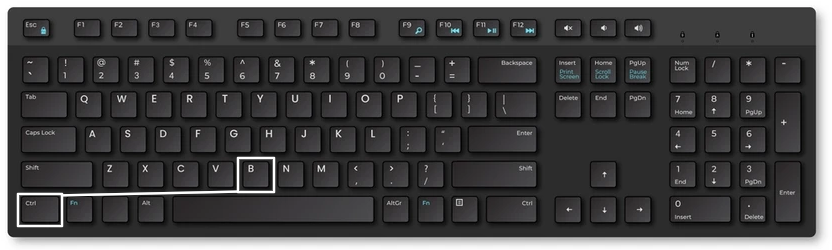
Ctrl+B will be your most useful short cut. This is your cut command which will create a splice, or break, in the timeline. It’s a handy shortcut, but will act differently depending on what is highlighted.
If nothing is highlighted the cut command will cut everything on every track. However if you only want one track cut if you click and highlight the appropriate track, the cut command will only cut that track.
Looking For More on DaVinci Resolve?
Check out our other DaVinci Resolve tutorials and level up your content game today!
[{"id":7295,"link":"https:\/\/treatyourgeek.co.uk\/davinci-resolve-essential-keyboard-shortcuts\/","name":"davinci-resolve-essential-keyboard-shortcuts","thumbnail":{"url":"https:\/\/treatyourgeek.co.uk\/wp-content\/uploads\/2025\/12\/davinci-essential-shortcuts.png","alt":"Davinci Resolve Essential Short Cuts Thumbnail"},"title":"DaVinci Resolve: Essential Keyboard Shortcuts","postMeta":[],"author":{"name":"Scruff","link":"https:\/\/treatyourgeek.co.uk\/author\/scruff\/"},"date":"Dec 17, 2025","dateGMT":"2025-12-17 13:25:55","modifiedDate":"2025-12-17 13:25:56","modifiedDateGMT":"2025-12-17 13:25:56","commentCount":"0","commentStatus":"open","categories":{"coma":"<a href=\"https:\/\/treatyourgeek.co.uk\/category\/tutorials\/davinci-resolve\/\" rel=\"category tag\">Davinci Resolve<\/a>","space":"<a href=\"https:\/\/treatyourgeek.co.uk\/category\/tutorials\/davinci-resolve\/\" rel=\"category tag\">Davinci Resolve<\/a>"},"taxonomies":{"post_tag":"<a href='https:\/\/treatyourgeek.co.uk\/tag\/black-magic-design\/' rel='post_tag'>Black Magic Design<\/a><a href='https:\/\/treatyourgeek.co.uk\/tag\/davinci-resolve\/' rel='post_tag'>davinci resolve<\/a><a href='https:\/\/treatyourgeek.co.uk\/tag\/editing\/' rel='post_tag'>editing<\/a><a href='https:\/\/treatyourgeek.co.uk\/tag\/essential\/' rel='post_tag'>essential<\/a><a href='https:\/\/treatyourgeek.co.uk\/tag\/keyboard-commands\/' rel='post_tag'>keyboard commands<\/a><a href='https:\/\/treatyourgeek.co.uk\/tag\/tutorial\/' rel='post_tag'>tutorial<\/a><a href='https:\/\/treatyourgeek.co.uk\/tag\/video\/' rel='post_tag'>video<\/a>"},"readTime":{"min":2,"sec":11},"status":"publish","excerpt":"An Introduction to DaVinci Resolve's keyboard shortcuts to help streamline your workflow."},{"id":7261,"link":"https:\/\/treatyourgeek.co.uk\/davinci-resolve-video-editing-software-introduction\/","name":"davinci-resolve-video-editing-software-introduction","thumbnail":{"url":"https:\/\/treatyourgeek.co.uk\/wp-content\/uploads\/2025\/12\/an-into-to-davinci-resolve.png","alt":"an introduction to davinci resolve thumbnail"},"title":"DaVinci Resolve - Video Editing Software - Introduction","postMeta":[],"author":{"name":"Scruff","link":"https:\/\/treatyourgeek.co.uk\/author\/scruff\/"},"date":"Dec 15, 2025","dateGMT":"2025-12-15 15:02:54","modifiedDate":"2025-12-15 15:07:13","modifiedDateGMT":"2025-12-15 15:07:13","commentCount":"0","commentStatus":"open","categories":{"coma":"<a href=\"https:\/\/treatyourgeek.co.uk\/category\/tutorials\/davinci-resolve\/\" rel=\"category tag\">Davinci Resolve<\/a>","space":"<a href=\"https:\/\/treatyourgeek.co.uk\/category\/tutorials\/davinci-resolve\/\" rel=\"category tag\">Davinci Resolve<\/a>"},"taxonomies":{"post_tag":"<a href='https:\/\/treatyourgeek.co.uk\/tag\/black-magic-design\/' rel='post_tag'>Black Magic Design<\/a><a href='https:\/\/treatyourgeek.co.uk\/tag\/content-creation\/' rel='post_tag'>content creation<\/a><a href='https:\/\/treatyourgeek.co.uk\/tag\/davinci-resolve\/' rel='post_tag'>davinci resolve<\/a><a href='https:\/\/treatyourgeek.co.uk\/tag\/editing-programs\/' rel='post_tag'>editing programs<\/a><a href='https:\/\/treatyourgeek.co.uk\/tag\/editing-software\/' rel='post_tag'>editing software<\/a><a href='https:\/\/treatyourgeek.co.uk\/tag\/streamer-tools\/' rel='post_tag'>streamer tools<\/a><a href='https:\/\/treatyourgeek.co.uk\/tag\/tutorial\/' rel='post_tag'>tutorial<\/a><a href='https:\/\/treatyourgeek.co.uk\/tag\/video-editing\/' rel='post_tag'>video editing<\/a>"},"readTime":{"min":2,"sec":52},"status":"publish","excerpt":"An introduction to DaVinci Resolve, the powerful video editing software you can add to your arsenal for free."}]