
OBS browser sources are used for a plethora of things. From sound alerts and pop-ups, they are used to bring all kinds of things into your streaming software. But how do you set them up?
Add An OBS Browser Source:
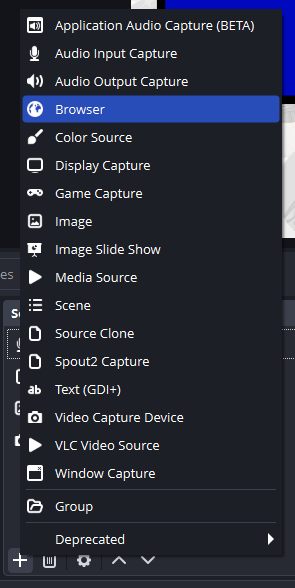
In the scenes dock of OBS, you can right-click to bring up a menu, or click the “+” button at the bottom of the dock.
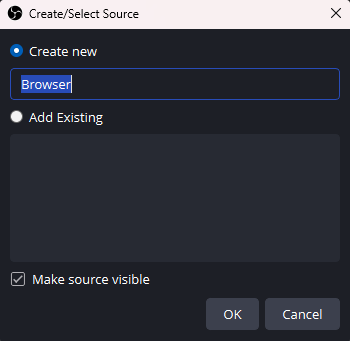
Navigate your way to the “Browser” option to add it as a source. This will bring up a new pop-up to name your browser source.
Set Up Your Source:
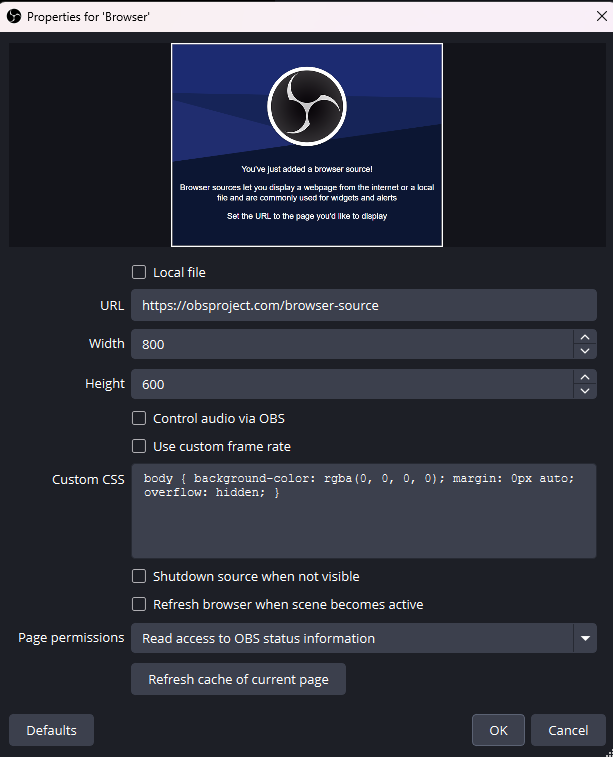
There are a few settings in the “Properties” menu for a browser source but let’s just highlight the important ones for now.
URL: This is where you paste the url for the thing you want to feature in OBS.
Control Audio Via OBS: You generally want to tick this for any sources with audio so that you can manage them while live from OBS.
Shutdown source when not visible: this is a good way to save processing speed. Generally this is for browser sources only on one scene.
Refresh browser when scene becomes active: This uses some processing power but not enough to cause issues. It simply refreshes your source in OBS to make sure it is up to date.
Combine Your Knowledge:
If you’ve been following our tutorials, then you will already have a good idea of different ways to use browser sources, but here are some bonus things to consider.
- You can add filters to browser sources
- You can control a browser source using Streamer.bot
- You can group and organise browser sources
- You can put a browser source in a nested scene.
Want More Tutorials?
Looking to level up your streams more? Check out our other tutorials now.
[{"id":7295,"link":"https:\/\/treatyourgeek.co.uk\/davinci-resolve-essential-keyboard-shortcuts\/","name":"davinci-resolve-essential-keyboard-shortcuts","thumbnail":{"url":"https:\/\/treatyourgeek.co.uk\/wp-content\/uploads\/2025\/12\/davinci-essential-shortcuts.png","alt":"Davinci Resolve Essential Short Cuts Thumbnail"},"title":"DaVinci Resolve: Essential Keyboard Shortcuts","postMeta":[],"author":{"name":"Scruff","link":"https:\/\/treatyourgeek.co.uk\/author\/scruff\/"},"date":"Dec 17, 2025","dateGMT":"2025-12-17 13:25:55","modifiedDate":"2025-12-17 13:25:56","modifiedDateGMT":"2025-12-17 13:25:56","commentCount":"2","commentStatus":"open","categories":{"coma":"<a href=\"https:\/\/treatyourgeek.co.uk\/category\/tutorials\/davinci-resolve\/\" rel=\"category tag\">Davinci Resolve<\/a>","space":"<a href=\"https:\/\/treatyourgeek.co.uk\/category\/tutorials\/davinci-resolve\/\" rel=\"category tag\">Davinci Resolve<\/a>"},"taxonomies":{"post_tag":"<a href='https:\/\/treatyourgeek.co.uk\/tag\/black-magic-design\/' rel='post_tag'>Black Magic Design<\/a><a href='https:\/\/treatyourgeek.co.uk\/tag\/davinci-resolve\/' rel='post_tag'>davinci resolve<\/a><a href='https:\/\/treatyourgeek.co.uk\/tag\/editing\/' rel='post_tag'>editing<\/a><a href='https:\/\/treatyourgeek.co.uk\/tag\/essential\/' rel='post_tag'>essential<\/a><a href='https:\/\/treatyourgeek.co.uk\/tag\/keyboard-commands\/' rel='post_tag'>keyboard commands<\/a><a href='https:\/\/treatyourgeek.co.uk\/tag\/tutorial\/' rel='post_tag'>tutorial<\/a><a href='https:\/\/treatyourgeek.co.uk\/tag\/video\/' rel='post_tag'>video<\/a>"},"readTime":{"min":2,"sec":11},"status":"publish","excerpt":"An Introduction to DaVinci Resolve's keyboard shortcuts to help streamline your workflow."},{"id":7261,"link":"https:\/\/treatyourgeek.co.uk\/davinci-resolve-video-editing-software-introduction\/","name":"davinci-resolve-video-editing-software-introduction","thumbnail":{"url":"https:\/\/treatyourgeek.co.uk\/wp-content\/uploads\/2025\/12\/an-into-to-davinci-resolve.png","alt":"an introduction to davinci resolve thumbnail"},"title":"DaVinci Resolve - Video Editing Software - Introduction","postMeta":[],"author":{"name":"Scruff","link":"https:\/\/treatyourgeek.co.uk\/author\/scruff\/"},"date":"Dec 15, 2025","dateGMT":"2025-12-15 15:02:54","modifiedDate":"2025-12-15 15:07:13","modifiedDateGMT":"2025-12-15 15:07:13","commentCount":"0","commentStatus":"open","categories":{"coma":"<a href=\"https:\/\/treatyourgeek.co.uk\/category\/tutorials\/davinci-resolve\/\" rel=\"category tag\">Davinci Resolve<\/a>","space":"<a href=\"https:\/\/treatyourgeek.co.uk\/category\/tutorials\/davinci-resolve\/\" rel=\"category tag\">Davinci Resolve<\/a>"},"taxonomies":{"post_tag":"<a href='https:\/\/treatyourgeek.co.uk\/tag\/black-magic-design\/' rel='post_tag'>Black Magic Design<\/a><a href='https:\/\/treatyourgeek.co.uk\/tag\/content-creation\/' rel='post_tag'>content creation<\/a><a href='https:\/\/treatyourgeek.co.uk\/tag\/davinci-resolve\/' rel='post_tag'>davinci resolve<\/a><a href='https:\/\/treatyourgeek.co.uk\/tag\/editing-programs\/' rel='post_tag'>editing programs<\/a><a href='https:\/\/treatyourgeek.co.uk\/tag\/editing-software\/' rel='post_tag'>editing software<\/a><a href='https:\/\/treatyourgeek.co.uk\/tag\/streamer-tools\/' rel='post_tag'>streamer tools<\/a><a href='https:\/\/treatyourgeek.co.uk\/tag\/tutorial\/' rel='post_tag'>tutorial<\/a><a href='https:\/\/treatyourgeek.co.uk\/tag\/video-editing\/' rel='post_tag'>video editing<\/a>"},"readTime":{"min":2,"sec":52},"status":"publish","excerpt":"An introduction to DaVinci Resolve, the powerful video editing software you can add to your arsenal for free."},{"id":7008,"link":"https:\/\/treatyourgeek.co.uk\/an-introduction-to-vdo-ninja-tutorial\/","name":"an-introduction-to-vdo-ninja-tutorial","thumbnail":{"url":"https:\/\/treatyourgeek.co.uk\/wp-content\/uploads\/2025\/10\/vdo-ninja-thumbnail.png","alt":""},"title":"An Introduction To VDO-Ninja - Tutorial","postMeta":[],"author":{"name":"Mashashy","link":"https:\/\/treatyourgeek.co.uk\/author\/mashashygooglemail-com\/"},"date":"Oct 15, 2025","dateGMT":"2025-10-15 10:32:24","modifiedDate":"2025-10-15 13:09:37","modifiedDateGMT":"2025-10-15 13:09:37","commentCount":"0","commentStatus":"open","categories":{"coma":"<a href=\"https:\/\/treatyourgeek.co.uk\/category\/tutorials\/streaming-tools\/\" rel=\"category tag\">Streaming Tools<\/a>","space":"<a href=\"https:\/\/treatyourgeek.co.uk\/category\/tutorials\/streaming-tools\/\" rel=\"category tag\">Streaming Tools<\/a>"},"taxonomies":{"post_tag":"<a href='https:\/\/treatyourgeek.co.uk\/tag\/conference\/' rel='post_tag'>conference<\/a><a href='https:\/\/treatyourgeek.co.uk\/tag\/discord\/' rel='post_tag'>discord<\/a><a href='https:\/\/treatyourgeek.co.uk\/tag\/skype\/' rel='post_tag'>skype<\/a><a href='https:\/\/treatyourgeek.co.uk\/tag\/stream\/' rel='post_tag'>stream<\/a><a href='https:\/\/treatyourgeek.co.uk\/tag\/streaming-tools\/' rel='post_tag'>streaming tools<\/a><a href='https:\/\/treatyourgeek.co.uk\/tag\/tutorial\/' rel='post_tag'>tutorial<\/a><a href='https:\/\/treatyourgeek.co.uk\/tag\/vdo-ninja\/' rel='post_tag'>vdo-ninja<\/a><a href='https:\/\/treatyourgeek.co.uk\/tag\/zoom\/' rel='post_tag'>zoom<\/a>"},"readTime":{"min":2,"sec":24},"status":"publish","excerpt":"Introducing VDO-Ninja, the nifty conference tool built into your browser. Become a pro with four handy ways to use it."}]
About the Author