
There are lots of uses for a random number generator command for Streamer.bot. Although the end results are different, the basic steps are the same. So let’s take a look at how to set up a command that generates a random number or percentage.
- Step 1 – Set Up Your Streamer.bot Command Triggers
- Step 2 – Add Random Number Sub-Action
- Step 3 – Send Message To Chat
- Step 4 – Customise Your Message
- More Streamer.bot Tutorials
Step 1 – Set Up Your Streamer.bot Command Triggers
As with all Streamer.bot commands, you need to start off by creating your Actions and Triggers. You can find more information on how to do this here.
Step 2 – Add Random Number Sub-Action
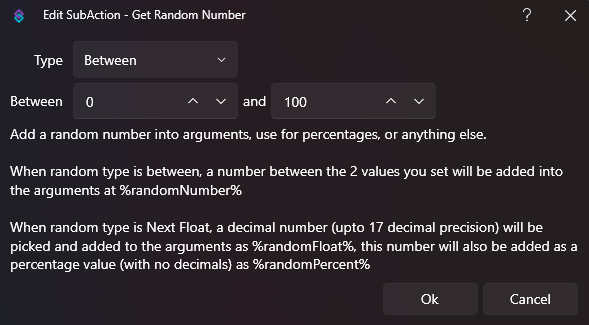
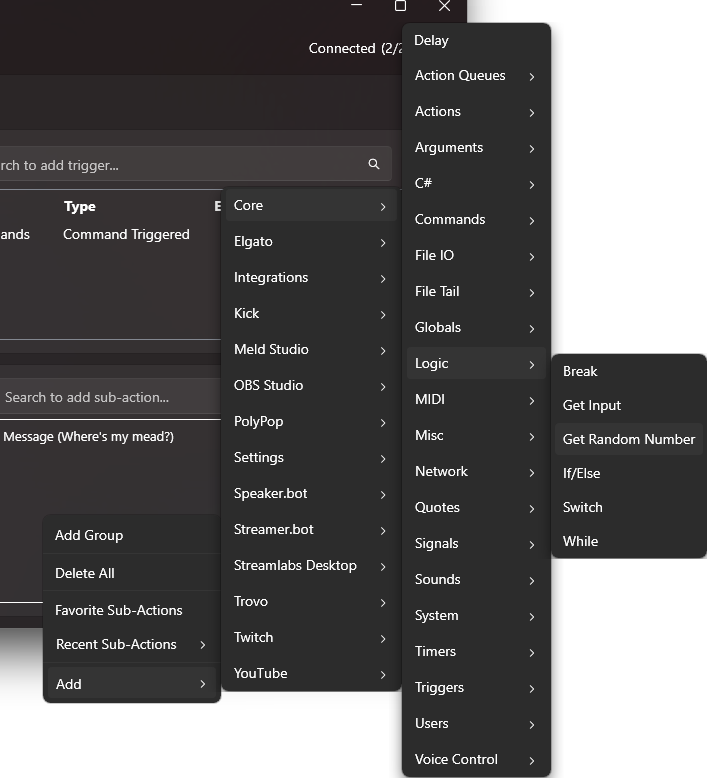
Adding a random number to your commands is super easy. All you need to do is search or navigate to the “Get Random Number” sub-action.
Add > Core > Logic > Get Random Number
This will bring up a pop-up menu allowing you to set your parameters for your output range.
Step 3 – Send Message To Chat
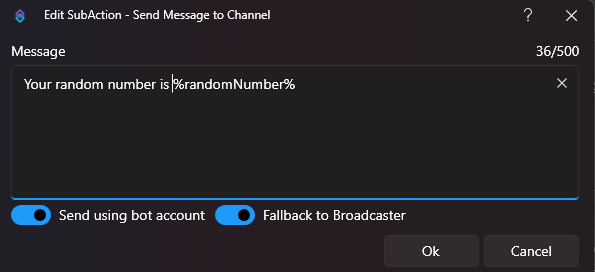
Now we have the random number, we need to put that number into a message to send to chat. You do this using %randomNumber% in the message box.
This example is linked to the !mead command.

Step 4 – Customise Your Message
There are different ways to customise your message from this point. Linking the results to conditional triggers and media is something we will cover at a later date but here’s a few to get you started.
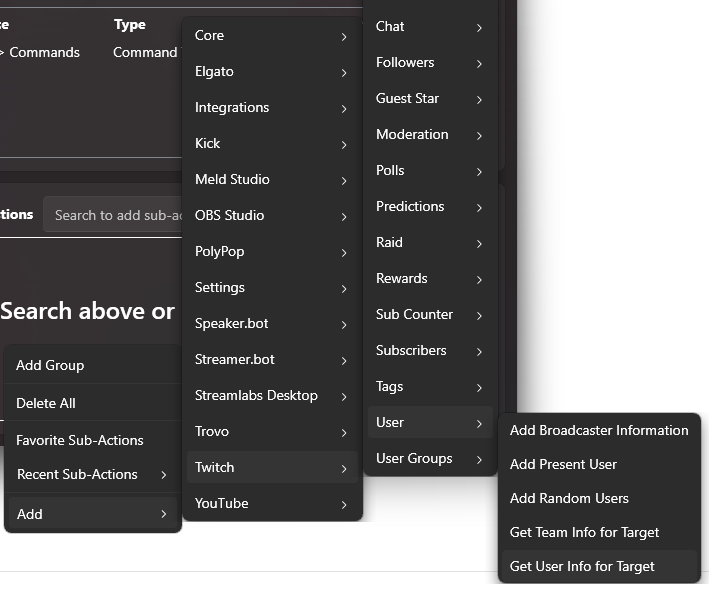
Add User Info
You can take user information from chat and add it to your message using “Get User Info for Target” like we did in our Shoutout Tutorial.
Get Creative
Use the command to encourage user engagement by tailoring it to your community.

More Streamer.bot Tutorials
We have lots of other tutorials to help you get started with Streamer.bot, with more to come. Check them out and level up your stream today.
Want More Tutorials?
Looking to level up your streams more? Check out our other tutorials now.
[{"id":7295,"link":"https:\/\/treatyourgeek.co.uk\/davinci-resolve-essential-keyboard-shortcuts\/","name":"davinci-resolve-essential-keyboard-shortcuts","thumbnail":{"url":"https:\/\/treatyourgeek.co.uk\/wp-content\/uploads\/2025\/12\/davinci-essential-shortcuts.png","alt":"Davinci Resolve Essential Short Cuts Thumbnail"},"title":"DaVinci Resolve: Essential Keyboard Shortcuts","postMeta":[],"author":{"name":"Scruff","link":"https:\/\/treatyourgeek.co.uk\/author\/scruff\/"},"date":"Dec 17, 2025","dateGMT":"2025-12-17 13:25:55","modifiedDate":"2025-12-17 13:25:56","modifiedDateGMT":"2025-12-17 13:25:56","commentCount":"2","commentStatus":"open","categories":{"coma":"<a href=\"https:\/\/treatyourgeek.co.uk\/category\/tutorials\/davinci-resolve\/\" rel=\"category tag\">Davinci Resolve<\/a>","space":"<a href=\"https:\/\/treatyourgeek.co.uk\/category\/tutorials\/davinci-resolve\/\" rel=\"category tag\">Davinci Resolve<\/a>"},"taxonomies":{"post_tag":"<a href='https:\/\/treatyourgeek.co.uk\/tag\/black-magic-design\/' rel='post_tag'>Black Magic Design<\/a><a href='https:\/\/treatyourgeek.co.uk\/tag\/davinci-resolve\/' rel='post_tag'>davinci resolve<\/a><a href='https:\/\/treatyourgeek.co.uk\/tag\/editing\/' rel='post_tag'>editing<\/a><a href='https:\/\/treatyourgeek.co.uk\/tag\/essential\/' rel='post_tag'>essential<\/a><a href='https:\/\/treatyourgeek.co.uk\/tag\/keyboard-commands\/' rel='post_tag'>keyboard commands<\/a><a href='https:\/\/treatyourgeek.co.uk\/tag\/tutorial\/' rel='post_tag'>tutorial<\/a><a href='https:\/\/treatyourgeek.co.uk\/tag\/video\/' rel='post_tag'>video<\/a>"},"readTime":{"min":2,"sec":11},"status":"publish","excerpt":"An Introduction to DaVinci Resolve's keyboard shortcuts to help streamline your workflow."},{"id":7261,"link":"https:\/\/treatyourgeek.co.uk\/davinci-resolve-video-editing-software-introduction\/","name":"davinci-resolve-video-editing-software-introduction","thumbnail":{"url":"https:\/\/treatyourgeek.co.uk\/wp-content\/uploads\/2025\/12\/an-into-to-davinci-resolve.png","alt":"an introduction to davinci resolve thumbnail"},"title":"DaVinci Resolve - Video Editing Software - Introduction","postMeta":[],"author":{"name":"Scruff","link":"https:\/\/treatyourgeek.co.uk\/author\/scruff\/"},"date":"Dec 15, 2025","dateGMT":"2025-12-15 15:02:54","modifiedDate":"2025-12-15 15:07:13","modifiedDateGMT":"2025-12-15 15:07:13","commentCount":"0","commentStatus":"open","categories":{"coma":"<a href=\"https:\/\/treatyourgeek.co.uk\/category\/tutorials\/davinci-resolve\/\" rel=\"category tag\">Davinci Resolve<\/a>","space":"<a href=\"https:\/\/treatyourgeek.co.uk\/category\/tutorials\/davinci-resolve\/\" rel=\"category tag\">Davinci Resolve<\/a>"},"taxonomies":{"post_tag":"<a href='https:\/\/treatyourgeek.co.uk\/tag\/black-magic-design\/' rel='post_tag'>Black Magic Design<\/a><a href='https:\/\/treatyourgeek.co.uk\/tag\/content-creation\/' rel='post_tag'>content creation<\/a><a href='https:\/\/treatyourgeek.co.uk\/tag\/davinci-resolve\/' rel='post_tag'>davinci resolve<\/a><a href='https:\/\/treatyourgeek.co.uk\/tag\/editing-programs\/' rel='post_tag'>editing programs<\/a><a href='https:\/\/treatyourgeek.co.uk\/tag\/editing-software\/' rel='post_tag'>editing software<\/a><a href='https:\/\/treatyourgeek.co.uk\/tag\/streamer-tools\/' rel='post_tag'>streamer tools<\/a><a href='https:\/\/treatyourgeek.co.uk\/tag\/tutorial\/' rel='post_tag'>tutorial<\/a><a href='https:\/\/treatyourgeek.co.uk\/tag\/video-editing\/' rel='post_tag'>video editing<\/a>"},"readTime":{"min":2,"sec":52},"status":"publish","excerpt":"An introduction to DaVinci Resolve, the powerful video editing software you can add to your arsenal for free."},{"id":7008,"link":"https:\/\/treatyourgeek.co.uk\/an-introduction-to-vdo-ninja-tutorial\/","name":"an-introduction-to-vdo-ninja-tutorial","thumbnail":{"url":"https:\/\/treatyourgeek.co.uk\/wp-content\/uploads\/2025\/10\/vdo-ninja-thumbnail.png","alt":""},"title":"An Introduction To VDO-Ninja - Tutorial","postMeta":[],"author":{"name":"Mashashy","link":"https:\/\/treatyourgeek.co.uk\/author\/mashashygooglemail-com\/"},"date":"Oct 15, 2025","dateGMT":"2025-10-15 10:32:24","modifiedDate":"2025-10-15 13:09:37","modifiedDateGMT":"2025-10-15 13:09:37","commentCount":"0","commentStatus":"open","categories":{"coma":"<a href=\"https:\/\/treatyourgeek.co.uk\/category\/tutorials\/streaming-tools\/\" rel=\"category tag\">Streaming Tools<\/a>","space":"<a href=\"https:\/\/treatyourgeek.co.uk\/category\/tutorials\/streaming-tools\/\" rel=\"category tag\">Streaming Tools<\/a>"},"taxonomies":{"post_tag":"<a href='https:\/\/treatyourgeek.co.uk\/tag\/conference\/' rel='post_tag'>conference<\/a><a href='https:\/\/treatyourgeek.co.uk\/tag\/discord\/' rel='post_tag'>discord<\/a><a href='https:\/\/treatyourgeek.co.uk\/tag\/skype\/' rel='post_tag'>skype<\/a><a href='https:\/\/treatyourgeek.co.uk\/tag\/stream\/' rel='post_tag'>stream<\/a><a href='https:\/\/treatyourgeek.co.uk\/tag\/streaming-tools\/' rel='post_tag'>streaming tools<\/a><a href='https:\/\/treatyourgeek.co.uk\/tag\/tutorial\/' rel='post_tag'>tutorial<\/a><a href='https:\/\/treatyourgeek.co.uk\/tag\/vdo-ninja\/' rel='post_tag'>vdo-ninja<\/a><a href='https:\/\/treatyourgeek.co.uk\/tag\/zoom\/' rel='post_tag'>zoom<\/a>"},"readTime":{"min":2,"sec":24},"status":"publish","excerpt":"Introducing VDO-Ninja, the nifty conference tool built into your browser. Become a pro with four handy ways to use it."}]
About the Author